Workflows
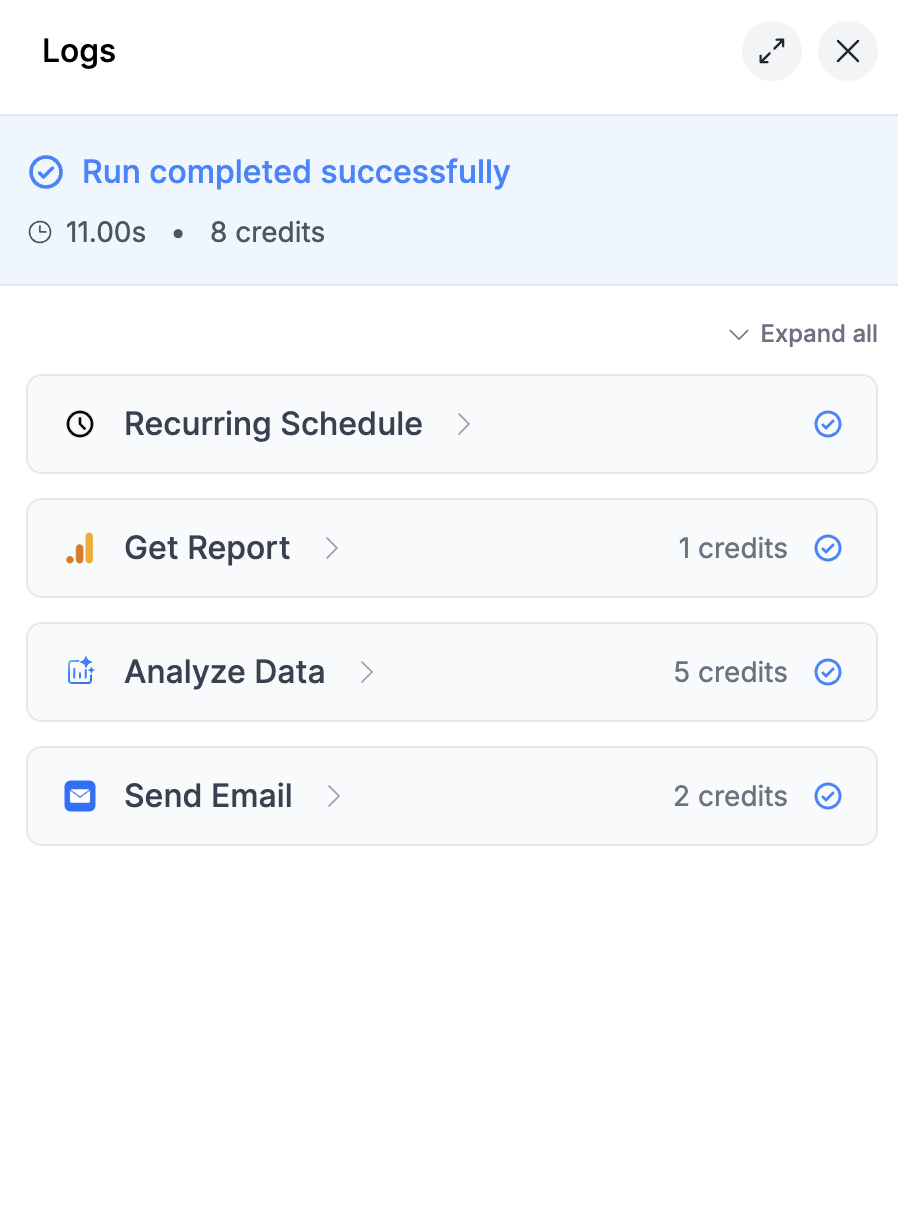
Workflow credits are charged per execution and per paid node.- Every workflow run consumes 1 credit, no matter how it’s triggered.
- External/data nodes like Google Analytics, Google Ads, Google Sheets, or Slides start at 1 credit per successful execution.
- AI node costs vary by model (see model tables below).
- Utility nodes—such as lists tools, date pickers, loops, and account selection—are free and never consume credits.
- Only successful nodes are charged. If a node fails, no credit is consumed for that node. Other successful nodes in the same workflow will be charged.
- AI nodes vary based on model.
- Data nodes may vary based on account count or request size.
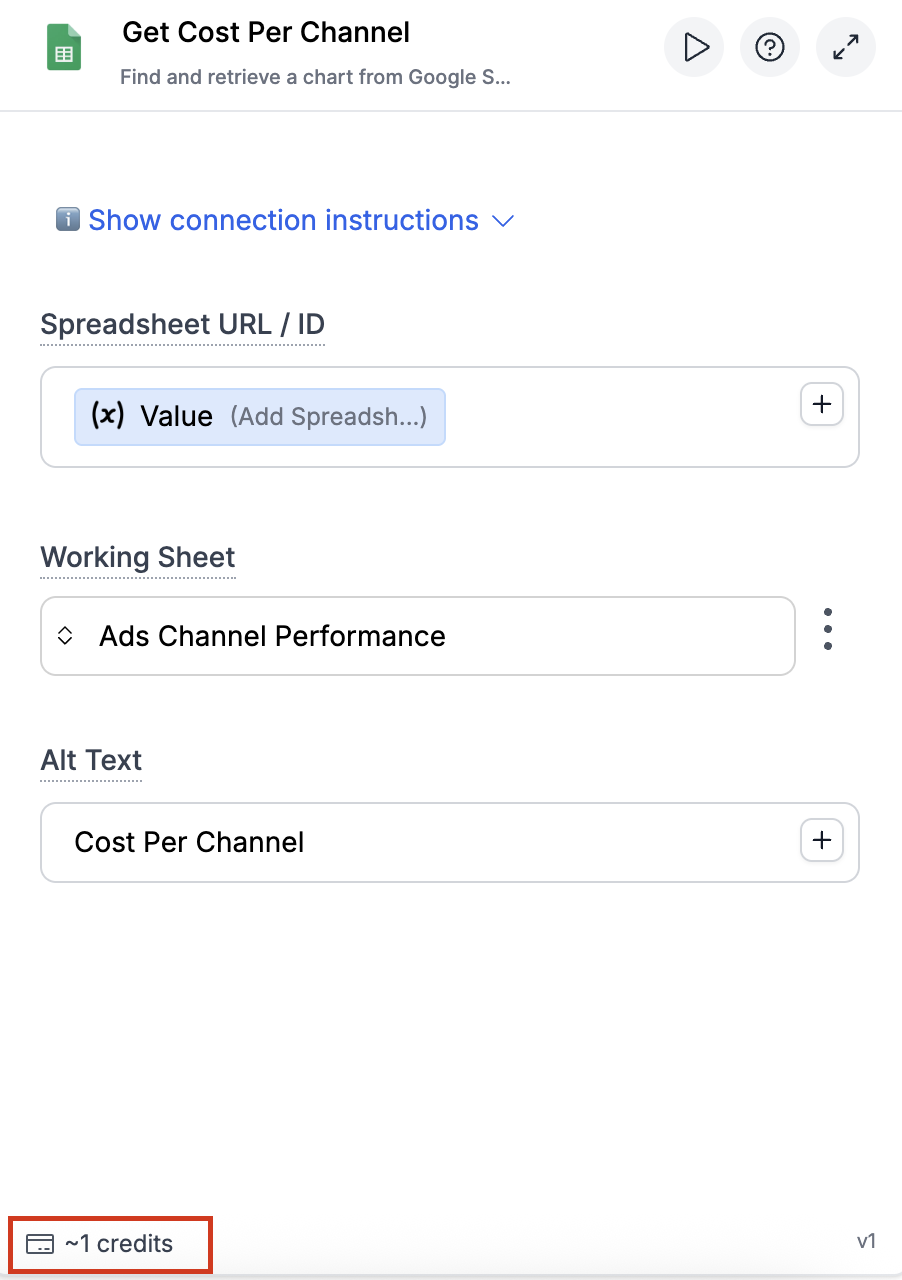
Workflow Credit-Saving Tips
When testing workflows, avoid running the entire flow:- Click the dropdown on a specific node.
- Select Run Node to execute only that part.
⚠️ Note: If the node has downstream connections, those will also run and may consume credits.
AI Model Credit Costs
Two numbers matter per model:- Node credits: the flat cost of one workflow AI node run on that model.
- Agent multiplier: what the model multiplies agent token usage by. See Agents below.
New models are added regularly. The model picker in the app always shows exactly what is available to you right now, so treat it as the live list if a brand new model is not in these tables yet.
OpenAI Models
Gemini Models
Claude Models
Deepseek Models
Image and Video Models
These run as workflow AI nodes and are charged per run, not per token.Agents
Agent usage is separate from workflow execution and follows agent-specific rules.- Markifact Copilot costs 1 credit per message.
- Task Agent usage is based on tokens consumed and the selected model multiplier.
Task Agent: How Credit Usage Works
- Each response uses input + output tokens.
- Different models apply different multipliers to token usage. See the Agent multiplier column in the model tables above.
- Example: gpt-6.1-sol and gpt-5.2 are treated as 1x, gpt-5.6-luna is 0.5x, claude-haiku-5.5 is 0.25x, while top reasoning models cost far more per token: claude-opus-5.5 is 8x and claude-fable-5 is 20x.
Why Long Agent Threads Cost More
- Longer conversations consume more tokens because history and context are included.
- Markifact automatically compacts conversation history to reduce token usage.
- Even with compaction, very long threads can become more expensive over time.
Agent Credit-Saving Tips
- Start a fresh task when switching to a different objective.
- Use lower-cost models for simple tasks. gpt-6-luna (0.25x) and claude-haiku-5.5 (0.25x) cost a quarter of a 1x model per token.
- Reserve the premium reasoning models (claude-fable-5, claude-opus-5.5, gpt-6-astra) for complex reasoning or heavy document work such as deep PDF and PPT tasks. At 8x to 20x, a single long thread on those adds up fast.
- For balanced quality and cost, default to gpt-6.1-sol (1x) for everyday tasks and switch up only when needed.
- Bring your own API keys when possible to reduce platform AI credit usage.
Using Your Own API Keys
You can bring your own API keys for AI models and significantly reduce your credit costs. Markifact supports three AI providers:- OpenAI
- Google Gemini
- Anthropic (Claude)
Credit Costs with Custom API Keys
When using your own API keys:- All AI nodes (Ask, Structure, Analyze Data, Analyze Image, Generate Image, Edit Image) consume 0 credits
- AI Agent node costs 1 credit flat per run, regardless of how many tools are used or time spent on the task
- Task Agent AI tokens are billed through your provider key
Bring Your Own API Keys
Learn how to connect your API keys, where to get them, and see the full credit breakdown.
MCP Servers
MCP lets you use Markifact operations from external AI clients like Claude, ChatGPT, and Cursor. Credit usage for MCP is simple:- Discovery and utility tools are free.
find_operations,get_operation_inputs,list_connections,get_file_url, andread_filecost 0 credits. - Running operations (
run_operationandrun_write_operation) costs credits based on the specific operation — the same as the equivalent workflow node.
Examples
The rule of thumb: utility and discovery operations (account selection, listing fields, searching) are free. Data operations (pulling reports, reading/writing to platforms) cost credits, typically 1 credit per operation.
MCP credit consumption appears in the Usage Dashboard under the MCP service type.
MCP Servers
Learn how to set up MCP servers, connect AI clients, and configure permissions.
Tracking Credit Usage
You can monitor credit usage in the Usage Dashboard (also available from the sidebar). In the Usage Dashboard, you can view:- Credit consumption by service (for example: Workflows, Agents, and Copilot)
- Credit consumption by team member
- Usage over time
- Recent activity for Agents, Workflows, and Copilot
- During a workflow run, each node displays its credit consumption.
- After the run finishes, the total credits used are shown in the footer.